Author Luke Version
v1.2 Date 2026-09-16 Status In
Progress Platforms BRAND_A &
BRAND_B Class M
Template base: prd.
Adjustment: concise L0 plus rules; follows Requirement
34's item-library-and-strategy model, adapted to a 1–20-item vertical
list in the lower half of Personal Center. The prototype visual
inventory is in a collapsed appendix.
Version history
Version
Date
Summary
v1.2
2026-09-16
Sections 1–6 redefine four scopes, the item library and strategies,
19 target pages, protected Log Out, and future agent-line
inheritance.
v1.1
2026-09-15
L0 introduced the withdrawn single-layer configuration draft.
v1.0
2026-09-15
Section 1 introduced the initial lower-half configuration
scope.
Table of contents
L0 · At a Glance
① One-sentence requirement
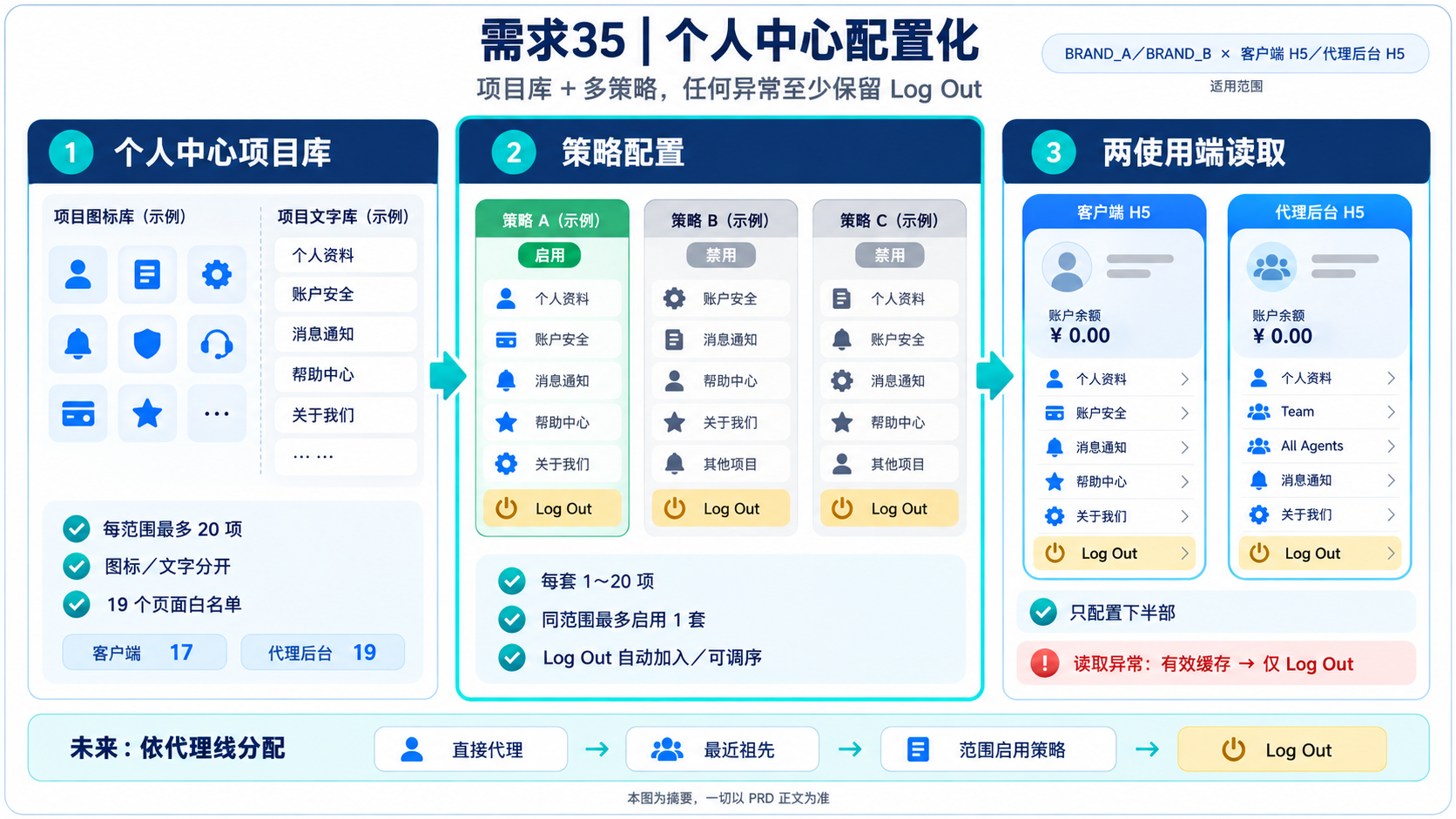
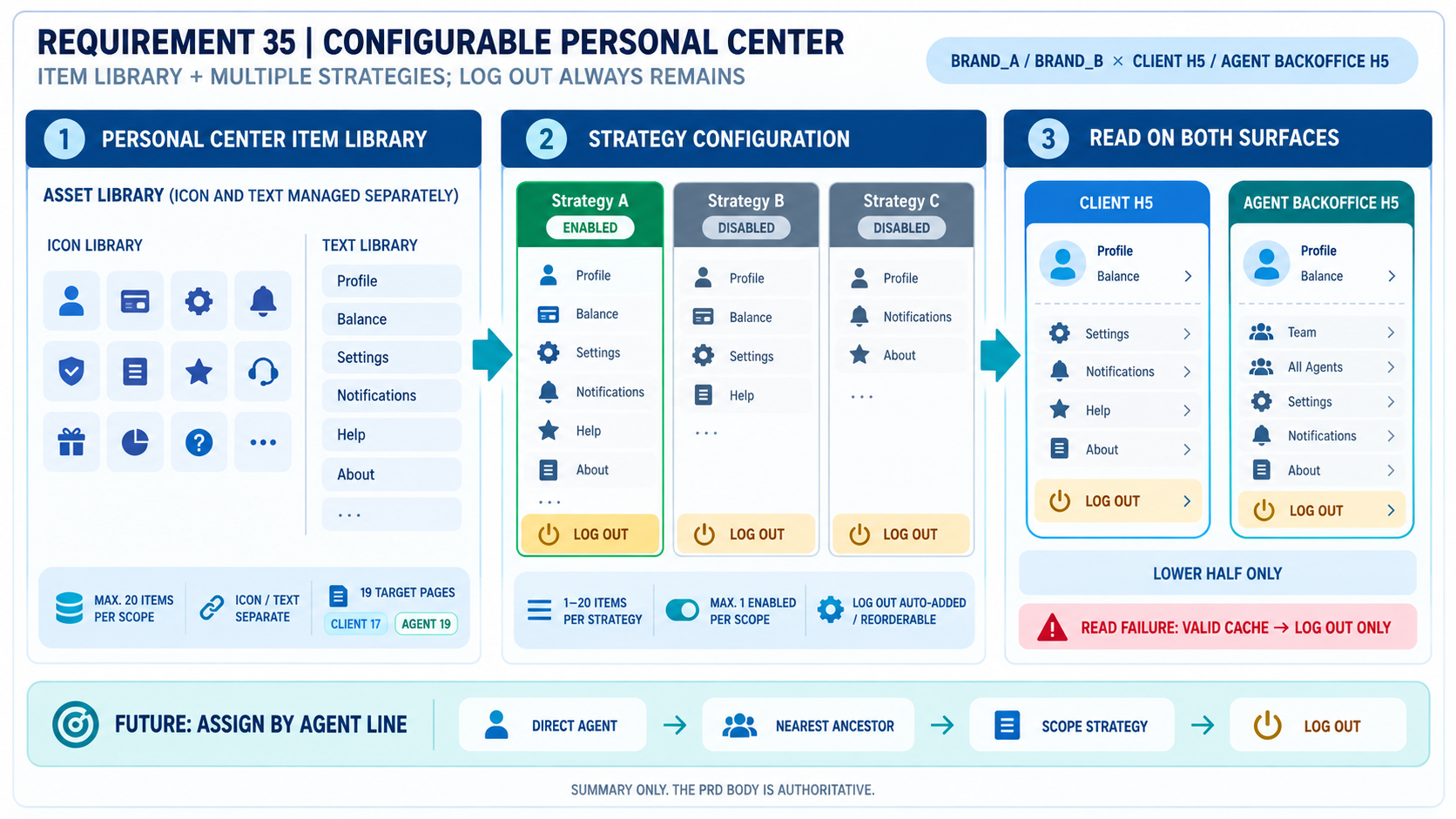
Operations maintains a Personal Center item library for each
BRAND_A / BRAND_B × Client H5 / Agent Backoffice H5 scope,
then combines items into 1–20-item strategies. The lower half renders
the active strategy and every failure path retains a working
Log Out.
② Core model
Object
Definition
Scope
Platform × usage surface; four fully isolated scopes
Personal Center item library
Up to 20 undeleted items per scope, including the protected
Log Out item
Strategy
References item IDs and order in the same scope; 1–20 items and must
include Log Out
Active strategy
The only strategy read by the usage surface in a scope; zero active
strategies is allowed
Agent-line assignment
No UI in this phase; storage must support independent strategy
assignment and ancestor inheritance later
③ Global invariants
#
Invariant
Acceptance
G1
Items, strategies, and target-page allowlists never cross the four
scopes
AC1AC16
G2
Each scope contains at most 20 items, including disabled items and
Log Out
AC2
G3
A strategy contains 1–20 items, always includes
Log Out, and has no duplicate item or target page
AC6AC7
G4
At most one strategy is active in a scope
AC9
G5
Log Out cannot be deleted, disabled, or redirected
AC3
G6
With no valid strategy or cache, show only built-in
Log Out; never show a blank list
Upper half of Personal Center; URL/route/game/campaign deep links;
mandatory VIP; configurable badges; review/scheduling; agent-line
assignment UI; redesign of target-page flows (Sections 1 and 4)
1. Scope and data relationship
1.1 Entry:
Website Management > Personal Center Configuration. The
strategy list is the primary page; Personal Center Item Library is a
secondary entry on the same page.
1.2 Scopes:
BRAND_A / BRAND_B × Client H5 / Agent Backoffice H5, four
in total. Query, create, edit, reference, activation, caching, and read
operations must remain in one scope.
1.3 Configured area: only the vertical entry list in
the lower half of the Personal Center panel changes. Avatar, account,
VIP level, balance, Deposit, Withdraw, and Close remain unchanged.
1.4 Relationship: items and strategies have
immutable system IDs. A strategy stores item IDs and order only; it does
not copy display text, icons, or target pages. Different strategies may
reference the same item.
1.5 Future inheritance: this phase allows at most
one active strategy per scope. A future agent-line assignment resolves
in this order: direct assignment for the current agent → nearest
assigned ancestor → active strategy in the scope → built-in
Log Out. Storage must not hard-code fixed slots or a single
permanent strategy per scope.
2. Personal Center Item Library
2.1 Fields and defaults
Field/control
Rule
System ID
Generated after save; immutable; hidden on create/edit forms
Backoffice Name
Required, 1–60 characters; internal-only label that may be Chinese
or English
Platform
BRAND_A / BRAND_B; inherit an explicit list filter,
otherwise BRAND_A; disabled on edit
Usage Surface
Client H5 / Agent Backoffice H5; inherit an explicit
list filter, otherwise Client H5; disabled on edit
Display Text
One English value only; delivered separately from the icon
Icon
One uploaded asset per item, not split by language; load failure
uses a system placeholder
Target Page
One option from the surface allowlist; default
Promo
Status
Enabled / Disabled; a general item defaults to
Enabled
Updated At / Administrator
System-maintained
2.1.1 Filters are Platform, Usage Surface, Status,
and Backoffice Name. The first three include All; defaults
are BRAND_A, Client H5, and All.
Page-size options are 10/Page and 20/Page,
default 10/Page.
2.1.2 BO configuration data is English-first:
Display Text has one English field and Icon has one upload field. The BO
shell may still switch Chinese and English interface labels; this does
not create two business-data variants.
2.2 Limit, references, and edits
2.2.1 A scope may contain no more than 20 undeleted
items, including enabled, disabled, and protected items. The page must
visibly say “Maximum 20 items.” Creation of item 21 is blocked.
2.2.2 A general item referenced by any undeleted
strategy cannot be disabled or deleted until removed from every
strategy. Delete is soft-delete. Editing a referenced item first shows
the number of affected strategies.
2.2.3 Changing a target page is rejected as one
whole save if it would create duplicate targets in any referencing
strategy. A target page is not a unique key inside the library
itself.
2.2.4 When creating an item, changing Platform or
Usage Surface after entering data requires confirmation and then clears
the unsaved item fields. Scope is immutable when editing.
2.3 Protected Log Out item
2.3.1 The system creates one Log Out
item in every scope. It counts toward the 20-item limit and always
executes the existing logout flow. It cannot be deleted, disabled, or
redirected.
2.3.2 Operations may edit the English display text
and single icon for Log Out. Logout is hidden
from the normal-item target dropdown to prevent a second logout
item.
3. Strategy Management
3.1 Fields and selection
Field/control
Rule
Strategy ID
Generated after save; immutable; hidden on create/edit forms
Strategy Name
Required, 1–60 characters; unique within a scope
Platform / Usage Surface
Radio buttons on create; visible but disabled on edit
Items and Order
Select 1–20 enabled items from the same scope; store IDs and order
only
Status
Enabled / Disabled; new and copied strategies default
to Disabled
Remarks
Required for create, copy, edit, enable, disable, and delete
3.1.1 The system auto-adds Log Out at
the bottom. Operations may reorder it but cannot remove it. A strategy
containing only Log Out is valid.
3.1.2 A strategy cannot repeat an item or target
page. Any validation failure rejects the entire save.
3.1.3 Changing scope on create requires confirmation
and clears selected items. Scope is immutable on edit. Strategy-list
filters are Platform, Usage Surface, Status, and Strategy Name; the
first three include All.
3.2 Copy, activation, and delete
3.2.1 Copy pre-fills item IDs and order within the
same scope, creates a new ID, pre-fills
{Source Strategy Name} - Copy, and remains Disabled.
Remarks, creator, and timestamps are not copied.
3.2.2 At most one strategy is active in a scope;
zero is allowed. If another strategy is active, activation is blocked
until operations disables the old one. The system never auto-switches
strategies.
3.2.3 Only a disabled strategy may be soft-deleted.
All write actions require remarks and administrator-log records.
4. Target Page Allowlist
Backoffice exposes a Target Page dropdown only—no route or URL.
Client H5 uses the first 17 entries; Agent Backoffice H5 uses all 19.
Logout is reserved for the protected system item and hidden
from normal items.
Enum
Chinese UI name
Client H5
Agent Backoffice H5
Promo
活动列表页
✓
✓
Inbox
站内信
✓
✓
Announcement
公告
✓
✓
Deposit
充值
✓
✓
Withdraw
提款
✓
✓
Chat
客服
✓
✓
Account
个人中心
✓
✓
VIP
VIP
✓
✓
Download
下载
✓
✓
Security Setting
安全中心
✓
✓
Fund Accounts
绑定提款账户
✓
✓
Balance Record
账变记录
✓
✓
Deposit Record
充值记录
✓
✓
Withdraw Record
提款记录
✓
✓
Bet History
投注记录
✓
✓
More
更多
✓
✓
Logout
登出
Protected
Protected
Team
团队
—
✓
All Agents
所有直属代理
—
✓
Existing login gates, permission checks, return paths, and error
handling on target pages remain unchanged. Badges such as
Announcement follow existing target-page logic and the
target item rather than a fixed position; there is no badge field in
this configuration.
5. Two-surface Read and Degradation
5.1 Client H5 and Agent Backoffice H5 each read the
active strategy for the current Platform plus their own Usage Surface,
render only referenced items, and preserve configured order.
5.2 When items exceed one screen, the Personal
Center panel scrolls vertically while Close remains operable. The upper
half does not change.
5.3 One failed icon uses a standard placeholder
without changing text, position, or click action. A broken general item
never removes Log Out.
5.4 With no active strategy, an invalid strategy, or
read failure, use the most recent valid cache first. Without valid
cache, show only built-in Log Out. Never render a blank
list.
5.5Log Out uses the existing
confirmation dialog and logout flow. The exact English evidence is
Are you sure to log out?.
6. Permissions, Concurrency, Logs, and Migration
6.1 Permissions: page-view, action, and Platform
permissions are separate. Without a Platform permission, its filters,
data, and edit entries are hidden; the server still rejects unauthorized
calls.
6.2 Concurrency: two users may open the same
version; the first submit succeeds and the stale submit is rejected as
one whole save with a refresh request.
6.3 Logs: the existing Administrator Log records
operator, time, scope, object ID and name, action, remarks, before/after
values, and strategy item IDs/positions.
6.4 Initial data: Client H5 should first evaluate
migration of the existing 11 items and order: VIP,
Security Setting, Announcement,
Fund Accounts, Balance Record,
Deposit Record, Withdraw Record,
Bet History, More, Download, and
Log Out. Agent Backoffice H5 migrates its current entries;
Team and All Agents exist only in agent
libraries. If migration is infeasible, launch with no active strategy,
rely on built-in Log Out, and have operations configure the
scope promptly.
7. Copy and Open Points
7.1 Backoffice copy
Scenario
English draft
Result
Item limit
A scope can contain up to 20 personal center items.
Modal; block create
Invalid strategy count
Select 1–20 items and keep Log Out.
Inline error; block save
Duplicate target
A strategy cannot contain duplicate target pages.
Inline error; reject whole save
Activation conflict
This scope already has an active strategy: {Strategy Name}. Disable it first.
Modal; old strategy unchanged
Referenced item
This item is still used by a strategy. Remove it from all strategies first.
Modal; no change
Surface mismatch
This page is not available on Client H5.
Inline error; block save
Stale version
The configuration was updated by another user. Refresh and submit again.
Modal; reject whole save
Empty remarks
Please enter remarks.
Inline error; block action
Logout confirmation
Are you sure to log out?
Existing surface confirmation dialog
Logout buttons
Cancel / Confirm
Existing surface confirmation dialog buttons
7.2 Open points
#
Question
Owner
Deadline
OP-1
Icon dimensions, format, size, and text length/overflow style
UI + Frontend
Development review
OP-2
Cache TTL, active invalidation, and maximum propagation time
Frontend + Backend
Development review
OP-3
Whether the current items and initial strategy in all four scopes
can be migrated
Development + Operations
Before launch
Appendices and Acceptance
Appendix A: Acceptance Criteria
#
P
Acceptance point
AC1
P0
Four scopes never cross in items, strategies, status, allowlists,
cache, or reads.
AC2
P0
Item 21 in a scope is rejected; disabled items and protected
Log Out count toward the visible maximum of 20.
AC3
P0
Log Out cannot be deleted, disabled, or redirected,
while its English text and single icon remain editable.
AC4
P1
Each general item maintains one English display text and one icon
separately; icon failure shows a placeholder.
AC5
P0
Client has 16 normal targets and Agent has 18; Logout
is hidden from both; Team and All Agents are
agent-only.
AC6
P0
A new strategy auto-adds bottom Log Out; 1–20 items
save, while 0, 21, or removal of Log Out is blocked.
AC7
P0
Duplicate item or duplicate target rejects the whole strategy
save.
AC8
P1
Log Out can be reordered; copy keeps combination/order
but creates a new disabled record.
AC9
P0
A second active strategy in one scope is blocked while the original
remains; zero active strategies is allowed.
AC10
P0
A referenced item cannot be disabled/deleted; an edit that
duplicates a target in any strategy is blocked.
AC11
P1
A 20-item panel scrolls to bottom while Close and
Log Out remain operable and the upper half stays
unchanged.
AC12
P1
Announcement badge follows the Announcement target and
disappears when that target is absent.
AC13
P0
Invalid/missing/read-failed strategy uses valid cache first, then a
working Log Out only.
AC14
P1
Scope switch on create confirms and clears; scope radio buttons are
visible but disabled on edit.
AC15
P1
Writes require remarks and Administrator Log captures before/after
values and ordering.
AC16
P0
A user without Platform permission cannot see or mutate that
Platform, including via direct server call.
AC17
P0
The stale concurrent submit fails while the first successful result
remains.
AC18
P1
Names allow 1–60 characters; IDs are hidden on forms and shown in
lists after save.
AC19
P1
Future assignment can link strategies to agent lines and resolve
direct agent → nearest ancestor → scope strategy → Log Out
without restructuring phase-one items or strategies.
Appendix B: Prototype Visual Inventory
Prototype Visual Inventory
Visual ID
Surface
Use
Evidence
VIS-BO-001
BO
Preview of the single uploaded icon
Section 2.1
VIS-CLIENT-001
Client
Strategy item icon, separate from display text
Section 5.1
VIS-CLIENT-002
Client
Standard placeholder for an icon load failure
Section 5.3
Only content images and image placeholders are listed; table icons,
phone frames, loading skeletons, and annotation symbols are
excluded.
Document Version: v1.2 | Date: 2026-09-16 | Author: Luke | Status: In
Progress