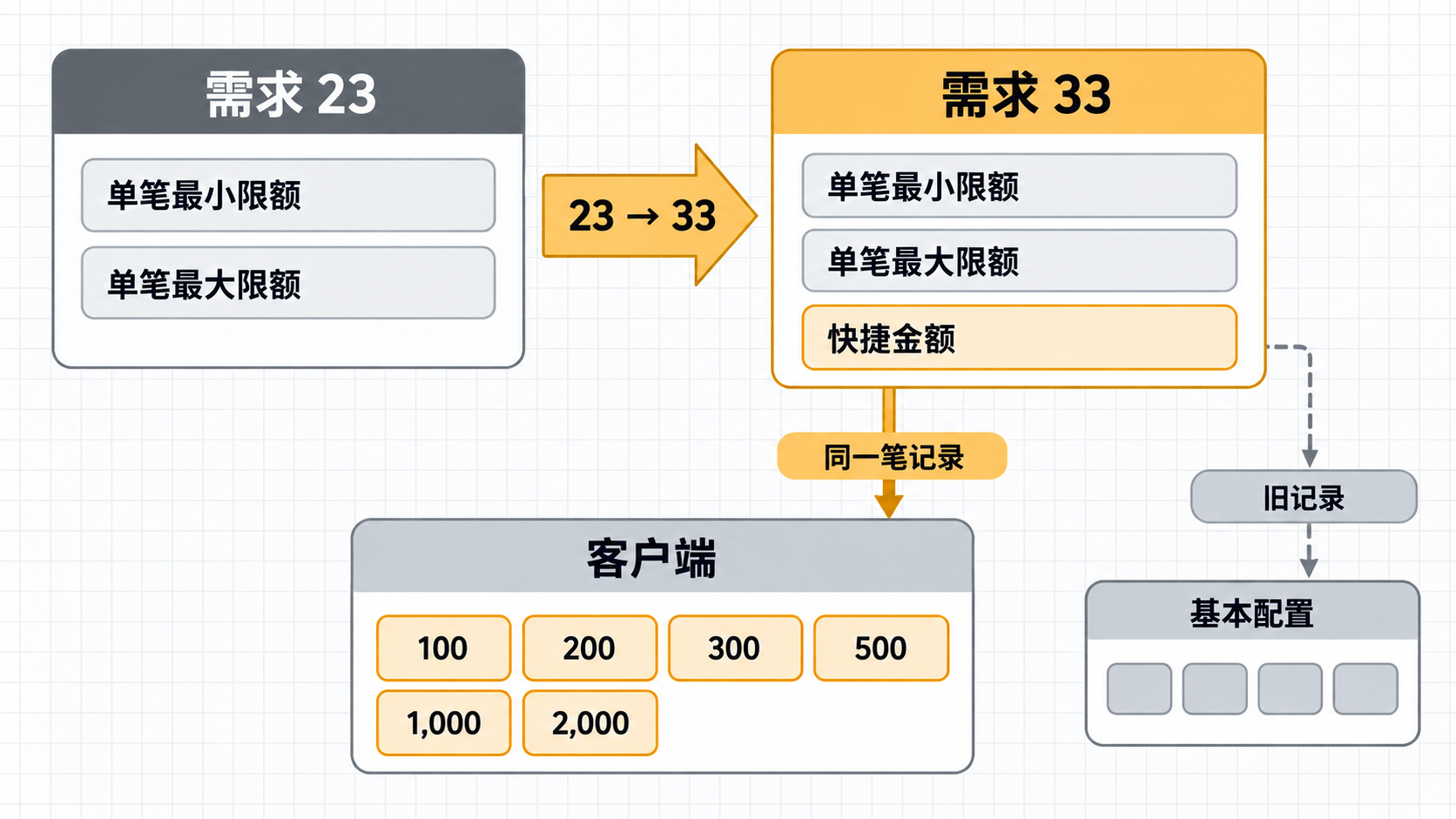
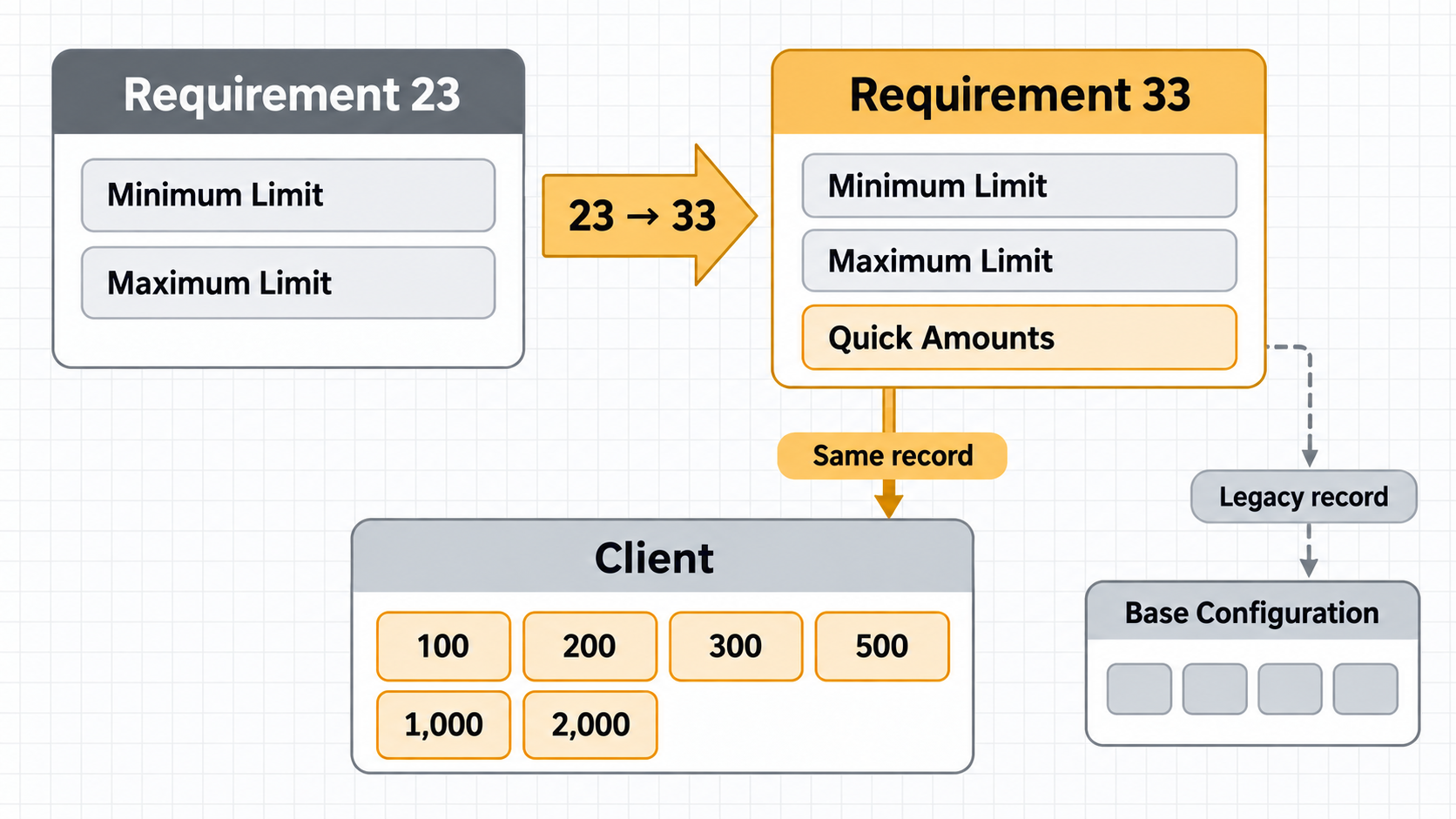
Author Luke Version
v1.6 Date 2026-09-17 Status In
Progress Platform BRAND_A &
BRAND_B Class M Requirement relationship Iteration of Requirement
23 UpstreamRequirement
23 PRD HTML ·
Requirement
23 BO Prototype HTMLIteration path23 → 33
Version History
Version
Date
Change Summary
v1.6
2026-09-17
Closed an internal PRD consistency gap by limiting G1 and AC2 to a
complete override record, aligning them with the legacy-record
compatibility exception in G4 and AC7.
v1.5
2026-09-17
Updated L0, §3, and AC traceability: clarified that a complete
override does not use Base Configuration, while a legacy record without
Quick Amounts is the sole compatibility exception under §4.3;
synchronized prototype section and AC mappings.
v1.4
2026-09-17
Updated the L0 delivery: fixed the PRD HTML Table of Contents by
replacing the unrendered [TOC] token with clickable section
navigation; added the shared 中文|EN switch to the Client
prototype while keeping the phone product UI in English.
v1.3
2026-09-17
Updated §3 and AC: the Client prototype can enter and Apply Quick
Amounts; online channels show Method/Total on Confirm and use
Amount accepted at the pre-navigation endpoint, while Venue
shows the 24-hour gaming-venue payment notice.
v1.2
2026-09-17
Updated L0 and the complete translated delivery: restored the same
Version History, Table of Contents, §1–§5, L2, and both appendices as
the Chinese PRD; returned the Client to the low-fidelity UI,
high-fidelity UX template.
v1.1
2026-09-17
Updated L0, §1, and §3: separated the Chinese and English
infographics, used six buttons to demonstrate four-per-row wrapping,
added Requirement 23 HTML traceability, and clarified that first-deposit
and non-first-deposit players do not use Base Configuration when a limit
configuration is matched.
v1.0
2026-09-17
Initial version. §1–§5 use the “Deposit Method × Master Agent” limit
record from Requirement 23 as the prerequisite, add Quick Amounts to
every record, and make the client read limits and Quick Amounts from the
same record when an override is matched.
Table of Contents
L0 · At a Glance
① One-sentence Requirement
Add Quick Amounts to the Master Agent limit create/edit
form from Requirement 23 so that each “Deposit Method × Master Agent”
record determines both the client’s deposit range and its Quick Amount
buttons.
Whenever the Deposit Method matches a complete Master Agent
limit configuration that already has Quick Amounts, both first-deposit
and non-first-deposit players read the deposit limits and Quick Amounts
from that record; Base Configuration is not used. The sole exception is
a legacy record created before this requirement with no Quick Amount
value, which temporarily falls back to Base Configuration Quick Amounts
under §4.3.
This requirement is an iteration of Requirement 23. Requirement 23
remains archived in its original form; all new rules, prototypes, and
acceptance criteria are owned by Requirement 33.
② Fixed Terms
Term
Only Meaning
Override record
One “Deposit Method × Master Agent” limit record created by
Requirement 23.
Quick Amounts
The list of amount buttons above the client’s deposit amount
field.
Base Configuration
The existing source of deposit limits and first-deposit Quick
Amounts when no override record exists.
Legacy record
An override record created before this requirement, containing
minimum and maximum limits but no Quick Amounts.
③ Global Red Lines
Invariant
Consequence if Violated
Verification Anchors
G1 When a complete override record with Quick
Amounts is matched, the minimum limit, maximum limit, and Quick Amounts
come from the same record.
Buttons and the allowed deposit range come from different
configurations.
AC1AC2
G2 Quick Amounts use English commas only; every
value is a positive integer from 1–50000 and falls within
the same record’s limits.
Invalid buttons, or buttons that can never be displayed, are
saved.
AC3AC4
G3 There is no business limit on the number of
Quick Amounts; deduplicate while preserving order, without automatic
sorting or truncation.
Operations’ configuration is rewritten.
AC5AC6
G4 When no override exists, a legacy record has no
value, or override reading fails, Quick Amounts retain the existing Base
Configuration behavior.
Existing users lose their buttons after release.
AC7AC8
G5 The client retains the existing minimum/maximum
validation and messages.
The new feature bypasses deposit limits.
AC9AC10
④ Scope and Explicit
Exclusions
This release only extends Requirement 23’s limit create, single edit,
batch edit, read, deletion fallback, and administrator audit log
behavior, and changes the client’s Quick Amount source. It does not
change Requirement 23’s completed account parsing, permission keys,
limit priority, deletion model, pagination, or messages; it does not
change Base Configuration; it does not add client amount error copy; and
it does not limit the number of Quick Amounts.
1. Prerequisites and Pages
1.1 Upstream Dependency
1.1.1 The current Requirement 23 deliverables remain
unchanged. This requirement only references their rules:
Requirement
23 PRD HTML /
Requirement
23 BO Prototype HTML. Each link opens in a new tab. If this document
does not rewrite a behavior, Requirement 23 remains authoritative.
1.2 Create Form
1.2.1 Add one row below
Minimum Per-Transaction Limit and
Maximum Per-Transaction Limit:
Field
Control
Required
Inline Hint
Quick Amounts
Single-line text field
Yes
Separate multiple amounts with English commas
1.2.2 When several Master Agents are created at
once, all successfully written override records share the submitted
limits and Quick Amounts. Requirement 23’s existing target-removal and
partial-success behavior remains unchanged.
1.3 Edit Modal
1.3.1 The single-edit and batch-edit modals add the
same Quick Amounts text field below the two limit fields.
Like the existing amount fields, it is blank when opened and required on
submission. After a batch edit, all successful targets use the same
submitted limits and Quick Amounts.
2. Quick Amount Input Rules
2.1 Parsing
2.1.1 The frontend and backend use the same
pipeline:
Split only on the English comma ,.
Trim whitespace around each entry; skip empty entries caused by
leading, trailing, or consecutive commas.
Parse every entry as an integer, deduplicate by numeric value, and
preserve the first occurrence.
The saved order is the client display order; do not automatically
sort ascending.
Require at least one cleaned value; there is no business limit on
the number of amounts.
2.2 Validation
2.2.1 Every non-empty entry must satisfy all of the
following:
It contains digits only and is a positive integer from
1–50000.
It does not use a minus sign, decimal point, thousands separator, or
Chinese comma.
It is greater than or equal to the
Minimum Per-Transaction Limit submitted in the same
request.
It is less than or equal to the
Maximum Per-Transaction Limit submitted in the same
request.
2.2.2 Any invalid non-empty entry blocks the whole
create/edit request; invalid amounts are not skipped. This does not
change the page’s existing object-level partial-success rules.
Present (state:
Override matched with Quick Amounts)
That override record
The same override record
Found
Legacy record without value (state:
Legacy record without Quick Amounts)
That override record
Existing first-deposit Quick Amounts from Base Configuration
Not found (state: No override matched)
—
Existing Requirement 23 Base Configuration rule
Existing first-deposit Quick Amounts from Base Configuration
Override read failed
—
Existing Requirement 23 fallback rule
Existing first-deposit Quick Amounts from Base Configuration, and
write a runtime log
3.1.1 Whenever the Deposit Method matches the
player’s Master Agent and that record already has Quick Amounts, both
first-deposit and non-first-deposit players read the deposit limits and
Quick Amounts from that same override record; Base Configuration is not
used. Player type must not trigger a second read of Base Configuration
buttons. Only a legacy record with no Quick Amount value may temporarily
fall back to Base Configuration Quick Amounts under §4.3.
3.2 Client Presentation
3.2.1 When the player enters the deposit page or
switches Deposit Method, the client reads the effective minimum limit,
maximum limit, and Quick Amounts. Quick Amounts follow their saved
order, render four buttons per row, and wrap automatically; any number
of values is shown without truncation or pagination.
3.2.2 Clicking a Quick Amount button only writes
that value into the existing amount field. The player may still enter an
amount manually.
3.2.3 The client defensively filters anomalous Quick
Amounts outside the effective minimum and maximum limits. This filtering
does not replace Backoffice save validation.
3.3 Amount Validation
3.3.1 On amount submission, the client continues to
run the existing numeric and range validation. Values below the
effective minimum show the existing minimum message; values above the
effective maximum show the existing maximum message. The message text,
Toast/Inline presentation, and blocking behavior do not change for this
requirement.
3.3.2 After amount validation passes, branch by
Deposit Method:
For online channels such as Maya, GCash, and QRPh, clicking
Confirm shows the existing deposit confirmation modal with
the current Method and Total; clicking
Go then enters the third-party payment flow. The Client
prototype does not simulate the external-page redirect and only shows
the Amount accepted Toast at the acceptance endpoint
immediately before navigation. This Toast is a prototype helper state
and does not add official product copy.
For Venue, clicking Confirm shows the existing
gaming-venue payment notice; it does not show Method/Total or Go. The
modal’s Confirm button only closes the notice.
Scenario
Existing Exact Copy
Below minimum
The deposit amount cannot be less than the minimum amount
Above maximum
The deposit amount cannot be greater than the maximum amount
Amount field Inline
Please enter the correct amount
Venue deposit request submitted
We have got your deposit request, kindly pay at the gaming venue within 24 hours. Or your deposit request could be automatically invalid.
4. Effective Time,
Deletion, and Compatibility
4.1 Effective Time
4.1.1 After a successful create or edit, the new
Quick Amounts are read the next time the player enters the deposit page
or switches Deposit Method. An already open page is not forcibly
refreshed. Existing backend limit validation remains the final guard on
submission.
4.2 Deletion and Related
Behavior
4.2.1 Deleting an override record returns both Quick
Amounts and limits to Base Configuration. Disabling a Deposit Method
retains Quick Amounts; physically deleting a Deposit Method deletes
Quick Amounts with the override records in the same transaction.
Removing a channel assignment does not delete data; the configuration
becomes effective again when reassigned.
4.3 Legacy Data
4.3.1 Do not batch-backfill legacy override records.
Their limits remain effective, while Quick Amounts continue to read Base
Configuration. On the next operations edit, Quick Amounts are required;
after saving, the record becomes complete.
5. Permissions, Messages, and
Audit
5.1 Permissions
5.1.1 Add no new permission keys. Create reuses
充值方式管理_设置限额新增 (Deposit Method Management — Set
Limit Create); single edit and batch edit reuse
充值方式管理_设置限额修改 (Deposit Method Management — Set
Limit Edit); reads and the page entry reuse
充值方式管理_设置限额 (Deposit Method Management — Set
Limit). Both frontend and backend must enforce them.
5.2 Backoffice Messages
Scenario
Exact Copy
Presentation
Quick Amounts missing / empty after cleanup
请填写完整 — Complete all required fields.
Inline; reuses Requirement 23
Invalid Quick Amount format or value range
快捷金额请输入 1-50000 的正整数,并以英文逗号分隔 —
Enter Quick Amounts as positive integers from 1 to 50000, separated by
English commas.
Inline
Quick Amount outside the submitted limits
快捷金额需介于单笔最小限额与单笔最大限额之间 — Quick
Amounts must be within the per-transaction minimum and maximum
limits.
Inline
Success
操作成功 — Operation successful.
Modal; reuses Requirement 23
No list data
No More Data
Empty state; reuses Requirement 23
5.3 Audit Trail
5.3.1 Administrator operation logs for create,
single edit, batch edit, delete, and cascading Deposit Method delete
include Quick Amounts in the before/after values. Batch operations still
write one summary with a target ID list and do not add a remarks
field.
L2 · Acceptance and
Appendices
Appendix A: Acceptance Criteria
#
P
Acceptance Point
AC1
P0
(G1) Under the same Deposit Method, Master Agent A and
Master Agent B can save different Quick Amounts; players under each
agent receive only their own record.
AC2
P0
(G1) When a complete override record with Quick Amounts
is matched, limits and Quick Amounts come from the same record; Base
Configuration Quick Amounts are not read.
AC3
P0
(G2) Quick Amounts accept 1,
50000, and valid range endpoints; reject 0,
negative values, decimals, 50001, thousands separators, and
Chinese commas.
AC4
P0
(G2) If any Quick Amount is below the submitted minimum
or above the submitted maximum, the entire request is blocked.
AC5
P0
(G3) All twelve example amounts are saved and displayed
in their original order without truncation.
AC6
P0
(G3) 100, 200,,100,50000, cleans to
100 / 200 / 50000 without automatic sorting.
AC7
P0
(G4) For a legacy record without Quick Amounts, limits
still come from the override record and Quick Amounts continue to come
from Base Configuration; after edit, the new values are used.
AC8
P0
(G4) When no record exists, reading fails, or the
record is deleted, Quick Amounts fall back to Base Configuration; read
failure writes a runtime log.
AC9
P0
(G5) The client renders four buttons per row and wraps
automatically; clicking a button only fills the value, and manual input
remains available.
AC10
P0
(G5) Values below the minimum and above the maximum
show the existing messages; anomalous out-of-range buttons are
defensively filtered.
AC11
P1
Batch create and batch edit write the same Quick Amount list to all
successful targets.
AC12
P1
Without create/edit permission, frontend and backend reject Quick
Amounts and limits together.
AC13
P1
The Client prototype accepts English-comma-separated Quick Amounts
and applies them; the new buttons immediately render four per row and a
button fills the amount field. For Maya/GCash/QRPh, Confirm shows
Method/Total and Go shows Amount accepted; for Venue,
Confirm shows the 24-hour gaming-venue payment notice.
Appendix B: Prototype Visual Checklist
Prototype Visual Checklist
Visual ID
Surface
Purpose
Evidence
VIS-BO-NONE
BO
The Backoffice prototype uses no images or image placeholders.
Form, list, and modal use HTML controls only.
VIS-CLIENT-001
Client
Grayscale placeholder for the Maya Deposit Method logo.
Wireframe placeholder block inside the Deposit Method button on the
phone screen.
VIS-CLIENT-002
Client
Grayscale placeholder for the GCash Deposit Method logo.
Wireframe placeholder block inside the Deposit Method button on the
phone screen.
VIS-CLIENT-003
Client
Grayscale placeholder for the QRPh Deposit Method logo.
Wireframe placeholder block inside the Deposit Method button on the
phone screen.
VIS-CLIENT-004
Client
Grayscale placeholder for the Venue Deposit Method logo.
Wireframe placeholder block inside the Deposit Method button on the
phone screen.
Document version: v1.6 | Date: 2026-09-17 | Author: Luke | Status: In
Progress