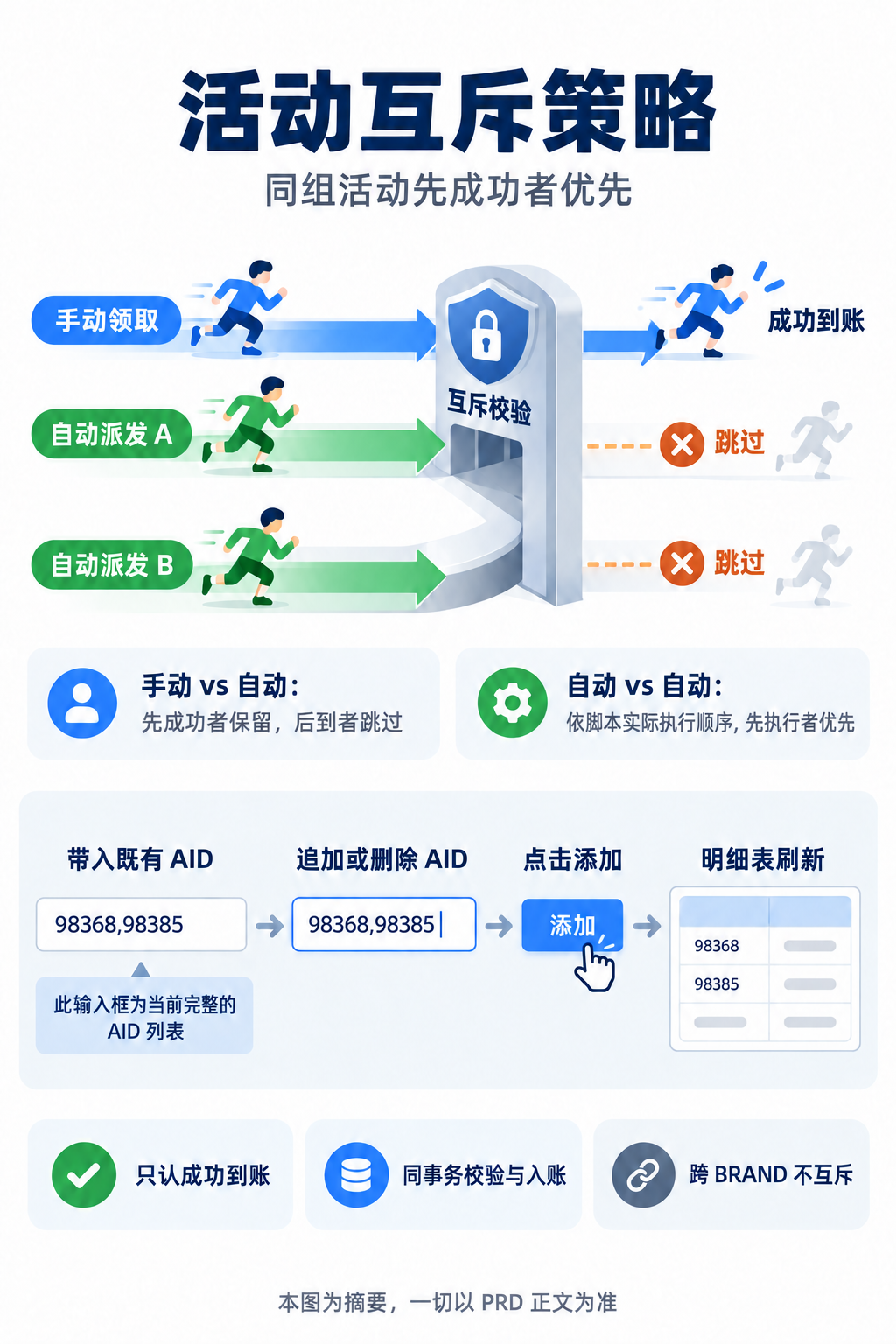
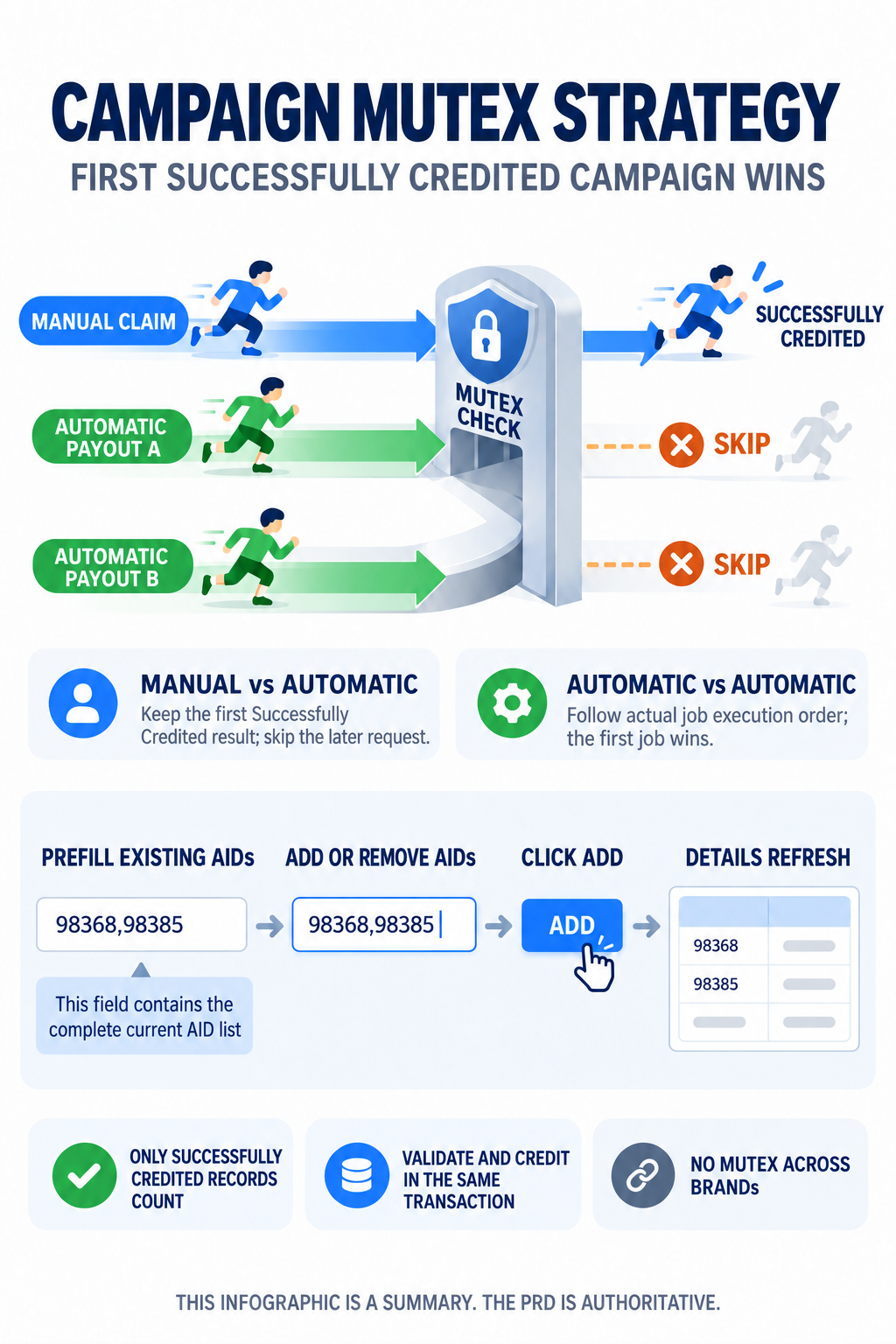
Author Luke Version v1.11
EN Date 2026-09-14 Status In
Progress Platforms BRAND_A &
BRAND_B Category K
English translation of the Chinese PRD v1.11. The Chinese PRD is
authoritative.
Source Version History
Version
Date
Change Summary
v1.11
2026-09-14
Clarified in §1.4 that Created At is
written only when creation first succeeds and must not be overwritten
by edit, enable, disable, delete, or automatic expiry.
v1.10
2026-09-11
Clarified in L0 that Strategy 2 also blocks
reclaiming the same campaign in the same Cycle Instance; defined the
calendar-day Expiry Date formula in §1.4;
reiterated the Strategy 2 template and primary-cycle checks at both Add
and Submit in §1.2.
v1.9
2026-09-11
Added paired Chinese and English backoffice messages in §4.2 for the bilingual prototype and English PRD page.
Business rules were unchanged.
v1.8
2026-09-11
Expanded the ordering rules for Manual Claim and Automatic Payout in
§2.2; changed editing in §1.3
so the complete existing AID list is prefilled and then refreshed after
additions or removals; shortened the document and added an
infographic.
Added the open question about the strategy unique key in §5 and reorganized the acceptance criteria.
v1.0
2026-08-10
Initial version. Added Strategy 2, platform pre-validation, and
Activity ID filtering.
Table of Contents
L0 · Quick Overview
① Requirement in One
Sentence
Configure mutually exclusive campaign groups under Campaign
Management > Campaign Mutex Strategy. After a player
receives a reward through Manual Claim or Automatic Payout, Strategy 1
blocks other campaigns in the group; within the same Cycle Instance,
Strategy 2 also blocks reclaiming the same campaign.
② Fixed Terminology
Term
Only meaning in this document
AID / Activity ID
The unique identifier in campaign master data; an ID is not reused
across BRANDs.
Successfully Credited
The reward has been posted successfully. Eligibility without
claiming, failed payouts, and reversed records do not count.
Payout Entry Point
Manual Claim means the player clicks to claim. Automatic Payout
means a scheduler or script triggers the payout for the player.
Cycle Instance
The current primary-cycle instance of a campaign. Used only by
Strategy 2.
Mutex Period
The effective duration of this strategy, not the runtime of the
campaigns.
③ Global Invariants
#
Invariant
Failure impact
Verification
G1
Only successfully credited records count.
Eligible-but-unclaimed or failed records may incorrectly block later
campaigns.
AC1
G2
Manual Claim and Automatic Payout use the same mutex rule for the
same player and matched strategy. The first transaction successfully
credited is kept; later transactions must not pay out.
Multiple campaigns in the same group may pay out.
AC2AC3AC4
G3
An automatic job must run the mutex check before payout. When
blocked, it skips that player.
An automatic job may bypass a prior Manual Claim result.
AC2AC5
G4
The mutex check and crediting must run in the same transaction and
under concurrency protection.
Two concurrent requests may both succeed.
AC4AC16
G5
Each matched strategy is evaluated independently. If any one
strategy blocks, the entire payout is blocked.
Overlapping strategies may fail to block a payout.
AC11
G6
A strategy applies only to players and campaigns under the same
BRAND.
Data from different BRANDs may affect one another.
AC12
G7
If strategy configuration cannot be read, do not pay out and do not
create a permanent mutex record.
A system error may cause overpayment or a permanent false
block.
Run the mutex check before Manual Claim and Automatic Payout (§2).
Strategy 1 uses a player-wide mutex; Strategy 2 uses a
per-Cycle-Instance mutex (§2.4–2.5).
Platform pre-validation, AID filtering, and complete-list editing
behavior (§1.1–1.3).
Out of Scope
Do not change campaign eligibility, reward calculation, or crediting
rules (§2.1).
Do not add campaign master data or bulk import (§1).
Do not add player-facing pages or hide claim buttons for other
campaigns in the group (§2.1).
Under Strategy 1, reclaiming the locked campaign passes the mutex
layer and remains subject to existing idempotency rules. Under Strategy
2, reclaiming the same campaign in the same Cycle Instance is blocked by
this requirement (§2.4–2.5).
Do not define the scheduling order for automatic payout jobs; only
define the mutex result when a job processes a player (§2.2).
Customer-service adjustments and backoffice manual adjustments are
not included in this release (§2.1).
1. Configuration and Editing
1.1 Form Fields
Field
Rule
Platform
BRAND_A or BRAND_B; required; locked after
creation.
Strategy Type
Strategy 1 or Strategy 2; required; locked after creation.
Strategy Name
1–30 standard characters; trim leading and trailing spaces; reject
zero-width characters, emoji, and control characters.
Mutex Period
1, 3, 5, 10, or
11 days, or a custom integer from 1–999;
reject leading zeros, full-width digits, decimals, negative values, and
empty input.
Mutually Exclusive Activity IDs
Comma-separated; at least 2 IDs; duplicate AIDs within one strategy
are silently deduplicated.
Remarks
1–200 characters; written to the Admin Action Log; not
displayed in the list.
1.1.1 Validation timing: only
Platform displays a red required mark. Clicking
Add without selecting a Platform is blocked
immediately. Other fields are blocked on submission.
1.1.2 Concurrent editing: if two operators edit the
same strategy, the later save overwrites the earlier save. No conflict
warning is shown.
1.2 Adding and Filtering AIDs
1.2.1 Filtering rule: after the operator clicks
Add, the system queries every AID in the input and
writes valid results into the detail table.
Input
Handling
Found under the selected Platform
Add to the detail table.
Different Platform, no permission, or not found
Silently remove.
Duplicate AID
Silently deduplicate and keep one entry.
Expired or disabled campaign
May be added; display its actual status.
1.2.2 Strategy 2 prerequisite: campaigns must have
the same template_id and the same primary cycle. Validate
when adding, and validate again on the server when submitting. Strategy
1 does not use this restriction.
1.3 Create and Edit
Operations
Scenario
Input and Add behavior
Create
The operator enters an AID list. Clicking Add
validates each ID and refreshes the details with the complete validated
list.
Edit
Opening the page prefills the input with all current AIDs and
displays the same campaigns in the detail table.
Add while editing
Append new AIDs after the existing list and click
Add. The system validates every ID and refreshes the
detail table from the complete input list.
Remove while editing
Remove target AIDs from the input and click Add.
The detail table removes those AIDs.
1.3.1 Complete list: Add does not
append only one item. Every click treats the current input as the
complete AID list, validates it, and rebuilds the detail table. After
validation, the input retains the complete validated list and is not
cleared automatically.
1.3.2 Editable fields: Platform and Strategy Type
are locked in edit mode. Strategy Name, Mutex Period, and the AID list
are editable. Remarks must be entered again for each operation and are
not prefilled from the previous operation.
1.4 List, Status, and Time
List columns:
ID | Strategy Name | Activity ID | Strategy Type | Platform | Status | Expiry Date | Created At | Updated At | Operator | Actions | Details
Detail columns:
No. | Activity ID | Template Name | Campaign Name | Platform | Campaign Status | Start Time | End Time
Event
Result
Create strategy
Status is Active. The effective period starts when
submission succeeds.
Expire
Status automatically becomes Expired.
Disable or delete
Mutex enforcement stops immediately; Expiry Date does not
change.
Enable
Restart a new period from the enable time using the existing
duration. Update only Expiry Date and Updated At; Created At remains
unchanged.
Change duration
Recalculate Expiry Date from the successful update time. Update
only Expiry Date and Updated At; Created At remains unchanged.
Delete
Soft-delete and retain the record for audit. It is hidden from
lists, filters, and exports and cannot be restored.
1.4.1 Expiry Date: an N-day Mutex Period includes
the effective date. Calculate it as 23:59:59 on the
effective date plus (N - 1) calendar days. Do not add
N × 24 hours to the effective timestamp.
1.4.2 Created At: write this value only when the
strategy is first created successfully. Edit, enable, disable, delete,
and automatic expiry must not overwrite Created At; these operations
update only Updated At. For enable or duration changes, use the
successful operation time as the separate reference point for Expiry
Date calculation; do not reuse or overwrite the Created At field.
1.4.3 Release rule: after a strategy is disabled,
deleted, or expired, the next check must no longer match that
strategy.
2. Mutex Evaluation
2.1 Effective Entry Points
2.1.1 Required checks: the same mutex evaluation
must run before crediting at both entry points:
The player clicks Manual Claim.
An Automatic Payout job processes the player.
2.1.2 No check is performed when evaluating campaign
eligibility or displaying campaign lists and details. An automatic job
must not bypass the mutex rule merely because it was not triggered by a
player click.
2.2
Ordering Between Manual Claim and Automatic Payout
Combination
Rule
Manual Claim vs Automatic Payout
Keep whichever transaction is successfully credited first. If Manual
Claim succeeds first, the automatic job skips that player. If Automatic
Payout succeeds first, the later Manual Claim is blocked.
Automatic Payout vs Automatic Payout
Follow actual job execution order. The first job that executes and
credits successfully wins; a later job skips the player after the mutex
check matches.
Concurrent arrival
One transaction succeeds under the shared transaction and lock. The
other transaction checks again and is blocked or skipped.
2.2.1 Automatic order: do not add an “smaller AID
wins” rule. Order is determined by the job that actually executes and
commits successfully first.
2.3 Matching a Strategy
2.3.1 A strategy participates in evaluation only
when every condition below is true:
Its campaign set contains the current AID.
Its BRAND equals the player's BRAND.
It is not disabled or soft-deleted.
The current time is within its effective window.
2.3.2 Empty set: allow the payout when the campaign
has no configured strategy or when no configured strategy satisfies all
matching conditions.
2.3.3 Overlapping strategies: the same campaign may
appear in multiple strategies. Evaluate every matched strategy
independently. If any one blocks, block the entire payout. A shared
campaign does not merge multiple strategies into a larger group.
2.4 Strategy 1: Player-wide
Mutex
2.4.1 Locked campaign: within the strategy's
campaign set and lookback scope, the locked campaign is the campaign
associated with the earliest successfully credited record by
claim_at.
Existing record
Result for the current request
No successful record in the group
Allow.
Current AID equals the locked campaign
Allow the mutex check; existing idempotency rules still decide
whether duplicate crediting is allowed.
Current AID differs from the locked campaign
Block or skip.
2.4.2 Same-second tie-breaker: if
claim_at is identical to the second, use successful
transaction commit order or the unique credit transaction sequence. Do
not use AID order.
2.4.3 Lookback lower bound: for an active campaign,
start from the strategy effective time. For an expired or disabled
campaign, or when campaign status cannot be read, start from that
campaign's runtime start. Log a system event when campaign status cannot
be read.
2.5 Strategy 2:
Per-Cycle-Instance Mutex
2.5.1 Cycle Instance scope: Strategy 2 evaluates
only the current primary-cycle instance and does not look back into
other instances.
Record in the current Cycle Instance
Result for the current request
No campaign in the group has been claimed
Allow.
Another campaign in the group has been claimed
Block or skip.
The same campaign has already been claimed
Block or skip.
A campaign was claimed only in a previous Cycle Instance
Allow.
2.5.2 Read failure: if the Cycle Instance identifier
cannot be obtained, do not pay out and handle it as a system error.
2.6 Evaluation Records
2.6.1 Record source: Manual Claim and Automatic
Payout use the same server-side identity, campaign, and
successful-record definitions.
Item
Rule
Identity
Obtain user_id and brand from the Token or
server-side job context. Do not accept client-supplied values.
Campaign
Obtain activity_id from the server-side object for the
current Manual Claim request or Automatic Payout job.
Successful record
Include only credited records and record whether the source was
Manual Claim or Automatic Payout.
claim_at
The time at which the payout request is accepted, not the time at
which final posting completes.
Mutex rejection
Manual Claim returns E_MUTEX_BLOCKED; Automatic Payout
skips the player and records the reason.
2.6.2 Automatic rejection: when a mutex match
occurs, the automatic job skips the player and records the reason. Do
not treat the skip as a system failure that should be retried.
3. Errors and Concurrency
Failure point
Handling
Invalid Token
Manual Claim returns E_UNAUTHORIZED.
Expired Token
Manual Claim returns E_TOKEN_EXPIRED.
Configuration, successful-record, or lock read failure
Do not pay out. Manual Claim returns E_SYS_BUSY;
Automatic Payout records a failure and follows the existing retry
mechanism.
Campaign status read failure
Use the stricter lookback rule for a non-active campaign and write an
Operating Log entry.
Cycle Instance read failure
Do not pay out; handle as E_SYS_BUSY.
Mutex match
Manual Claim returns E_MUTEX_BLOCKED; Automatic Payout
skips the player.
A system error must not create a permanent mutex rejection record. If
an automatic job does not pay out because of a system error, it must not
be recorded as a mutex match.
Concurrency lock scope: Strategy 1 uses
player + strategy; Strategy 2 uses
player + strategy + Cycle Instance. Evaluation and
successful crediting must complete in the same transaction.
4. Copy, Permissions, and
Audit Logs
4.1 Player-facing Copy
Scenario
Error Code
Copy
Mutex block
E_MUTEX_BLOCKED
Platform
standard You've already joined a conflicting promotion.
Not logged in
E_UNAUTHORIZED
Platform
standard Please log in first to proceed.
Session expired
E_TOKEN_EXPIRED
Platform
standard Session expired. Please log in again.
System error
E_SYS_BUSY
Platform
standard Something went wrong. Please try again later.
4.1.1 Automatic Payout: a mutex block during
Automatic Payout does not display an immediate player-facing message.
The job records only the skip reason. Responses and job logs must not
expose the strategy ID, campaign set, locked campaign, Expiry Date, or
lookback lower bound.
4.2 Backoffice Copy
Scenario
Message
Click Add without selecting a Platform
Error: Please select a platform first.
Fewer than 2 campaigns
Error: At least 2 mutually exclusive campaigns are required.
Strategy 2 prerequisites are not met
Error: Mutually exclusive campaigns must use the same campaign template and primary cycle.
Invalid Strategy Name
Error: Strategy Name supports 1–30 standard characters only.
Invalid custom duration
Error: Enter a positive integer from 1–999.
Attempt to edit a locked field
Error: This field cannot be changed after creation.
Missing Remarks
Error: Remarks are required. Enter 1–200 characters.
Remarks exceed the limit
Error: Remarks must not exceed 200 characters.
No permission
Error: You do not have permission to perform this action.
Enable, disable, or delete
Confirm {action} this strategy? This action will be recorded in the Admin Action Log.
Remarks are required.
4.2.1 Presentation: all backoffice errors use modal
dialogs.
4.3 Permissions and Logs
Permission
Capability
Campaign Mutex Strategy
View the list, query, and expand details.
Campaign Mutex Strategy - Operations
Create, edit, enable, disable, and delete.
Campaign Mutex Strategy - Export
Export all filtered results.
4.3.1 BRAND isolation: rows, Platform options, and
export data for unauthorized BRANDs are hidden. The server must validate
permission again.
4.3.2 Logs: create, edit, enable, disable, delete,
and export actions write an Admin Action Log entry containing object
ID, values before and after the change, operator, and Remarks.
Automatic expiry records the operator as system.
5. Open Questions
#
Question
Decision Owner
Deadline
OP-1
Does the Strategy 1 lookback query require a maximum time
range?
Engineering
Engineering review
OP-8
Which existing field or API provides the Cycle Instance identifier
for Strategy 2?
Engineering
Engineering review
OP-9
May Strategy Names be duplicated? May two strategies contain exactly
the same campaign set?
Engineering + Operations
Before development
The Automatic Payout ordering rule is final: do not sort by AID.
Follow actual job execution and successful commit order.
Appendix A: Acceptance Criteria
#
P
Acceptance Criterion
AC1
P0
Eligible-but-unclaimed, failed-payout, and reversed records do not
consume a mutex slot (G1).
AC2
P0
Player successfully claims A manually; a later automatic payout for
B skips the player and does not credit B (G2G3).
AC3
P0
Automatic payout for A succeeds first; a later Manual Claim for B is
blocked (G2).
AC4
P0
Manual Claim for A and Automatic Payout for B arrive concurrently.
Only one is credited; the other checks again and is blocked or skipped
(G2G4).
AC5
P0
Automatic job A succeeds first and job B runs later. B skips the
player, and the system does not reorder by AID (G3).
AC6
P0
Opening Edit prefills the input and detail table with all current
AIDs.
AC7
P0
Appending new AIDs after the existing list and clicking Add
validates every ID and displays the complete updated list.
AC8
P0
Removing an existing AID from the input and clicking Add removes it
from the detail table.
AC9
P1
With cross-BRAND, unknown, and duplicate AIDs, cross-BRAND and
unknown IDs are removed, duplicates are kept once, and the input retains
the complete validated list.
AC10
P0
Strategy 2 blocks adding or submitting campaigns with different
templates or primary cycles. Strategy 1 is not subject to this
restriction.
AC11
P0
If one AID matches overlapping strategies, evaluate each strategy
independently; any blocking result blocks the entire payout
(G5).
AC12
P0
A strategy does not participate when its BRAND differs from the
player's BRAND (G6).
AC13
P0
Strategy 1 has earliest successful record A. Claiming B is blocked;
claiming A is decided only by existing idempotency rules.
AC14
P0
Under Strategy 2, if A has been claimed in the current Cycle
Instance, claiming A again or claiming B is blocked. A new Cycle
Instance allows claims again.
AC15
P0
If configuration or successful records cannot be read, do not pay
out and do not write a permanent mutex record (G7).
AC16
P0
When two automatic jobs concurrently process the same player and
campaign group, only one is credited and the other is skipped
(G4).
AC17
P0
A disabled, deleted, or expired strategy releases immediately.
Disabling and deleting do not change the original Expiry Date.
AC18
P0
When an automatic job matches a mutex rule, it skips the player,
records E_MUTEX_BLOCKED, and does not send an immediate
player-facing message.
Prototype Visual Checklist
Prototype Visual Checklist
Visual ID
Surface
Purpose
Evidence
VIS-BO-NONE
BO
The backoffice list and configuration form do not use images or
image placeholders.