首页底部导航与消息中心优化 ·
PRD
作者 Luke 版本
v1.9 日期 2026-10-06 状态
待开发评审 平台 BRAND_A &
BRAND_B 类 X
模板基准 prd
模板调整说明:沿用最新版精简 PRD
骨架;本需求为纯客户端交互,保留既有 X 类,不硬套
P/R/M/S/K/W。正文合并「入口路由、消息中心、已读红点、批量删除与异常」;不重复既有公告发布与站内信后台规格。原型视觉清单依新版模板收在默认折叠附录。
版本记录
| 版本 |
日期 |
变更摘要 |
| v1.9 |
2026-10-06 |
依现网截图把列表动作更正为
View,并明确未读红点只出现在消息行与底栏
Inbox;Announcement/Inbox Tab
标题不显示红点(§2~§3)。 |
| v1.8 |
2026-10-06 |
依现网截图移除不存在的
Mark as Read/批量已读;多选底栏只保留
Select All 与
Delete,逐条进详情即读规则不变(§2~§3)。 |
| v1.7 |
2026-10-06 |
删除需求 34 边界段;更正未登录点 Inbox/Account
后的登录成功落点为已登录首页(§1);依新版模板将原型视觉清单收为附录 C。 |
| v1.6 |
2026-10-05 |
补齐 Client 原型章节追溯,并将提示语的 English
上线文案整理成可机器核对的独立单元格;业务口径不变(§5)。 |
| v1.5 |
2026-10-05 |
明确底栏基准完整显示 5 项;未登录点 Inbox
复用已上线注册/登录路由;跑马灯无论登录态只进入 Announcement
单分页;拆分「交付物」与「内容图片槽位」清单,并明确 BO HTML 不适用(§1、附录 C)。 |
| v1.4 |
2026-10-05 |
重构为最新版精简版;业务口径不变;补需求 34 的覆盖边界、双语交付与
Client HTML 追溯(§1~§4)。 |
| v1.3 |
2026-07-29 |
定案公告公共降级、品牌与生效过滤、逐条/批量已读、越权保护及乐观态(§3~§4)。 |
| v1.2 |
2026-07-29 |
定案进详情即读、未登录公告恒未读、批量删除与异常行为(§2~§4)。 |
| v1.1 |
2026-07-29 |
定案双登录态、入口初始 Tab 与红点模型(§1~§3)。 |
| v1.0 |
2026-07-29 |
初版:底栏、个人中心、跑马灯与消息中心调整(§1~§2)。 |
目录
L0 · 快速掌握
① 一句话需求
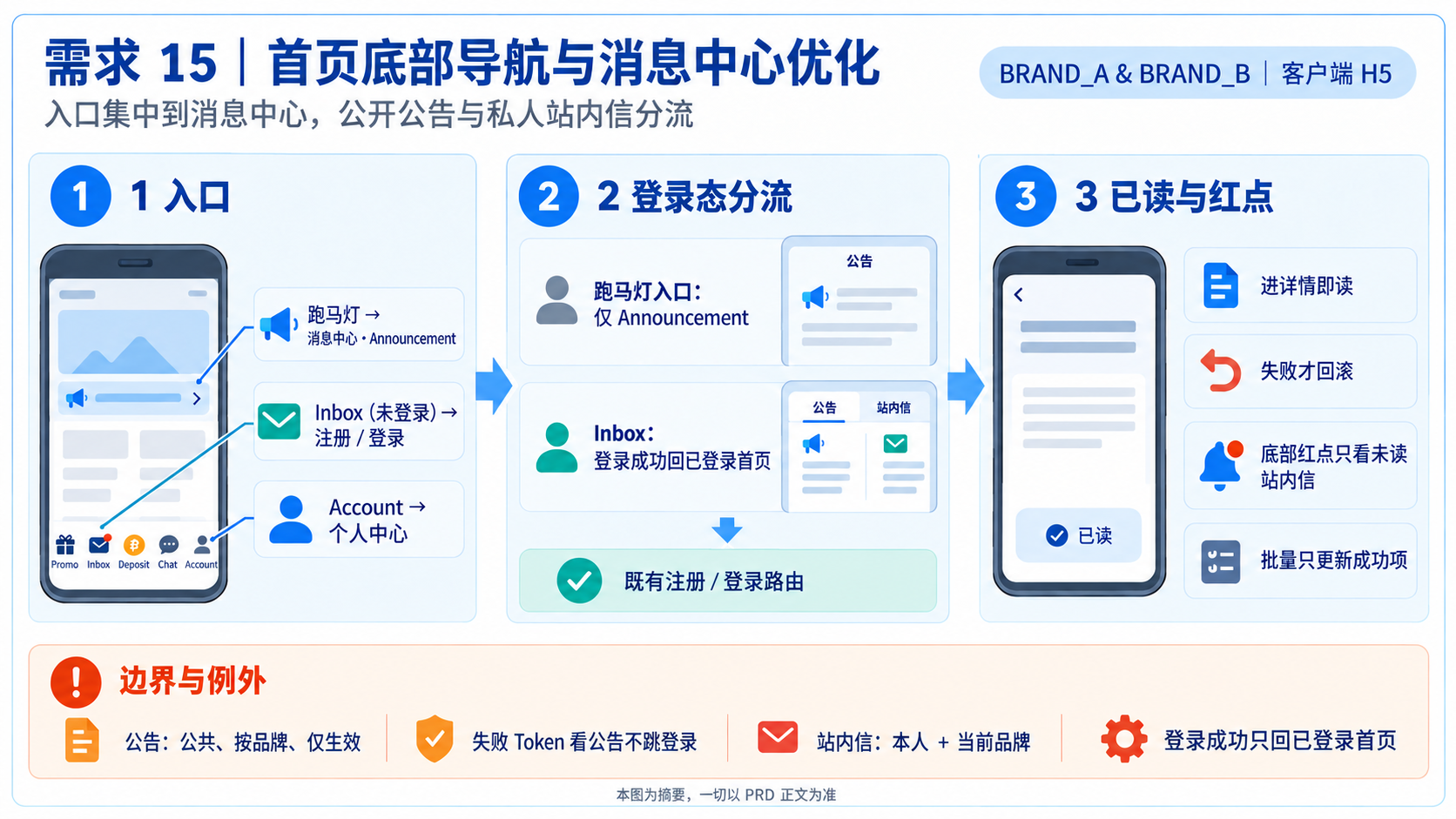
把消息中心提升为客户端主要入口:跑马灯只进入
Announcement 单分页;底栏 Inbox
保留既有登录限制与回跳,并以一致的逐条已读、批量删除及红点规则呈现结果。
② 术语写死表
| 词 |
本文唯一含义 |
| Announcement/公告 |
按当前品牌发布的公共广播;无 Token 或 Token 失效仍可读取。 |
| Inbox/站内信 |
只供已登录本人读取的私人消息。 |
| 消息中心 |
有返回、无底栏的二级页;承载公告与站内信。 |
| 生效公告 |
既有公告发布模块判定为已发布、published_at <= now
且未过期的公告。 |
| 乐观已读 |
点进详情时先在本地消红点;只有已读请求明确失败才回滚。 |
③ 全局红线表
| # |
不变量 |
破了会怎样 |
验证锚点 |
| G1 |
公告可公开读取;站内信只能由本人读取 |
公开页被误挡,或私人消息泄露 |
AC8 AC9 AC17 |
| G2 |
底部 Inbox 红点只代表未读站内信 |
公告会制造错误的私人消息提醒 |
AC12 |
| G3 |
未登录公告恒未读,点开也不消红点 |
前端伪造无法归属到人的阅读状态 |
AC11 |
| G4 |
进入详情即读;失败才回滚,刷新不得抢先覆盖 |
红点闪回或误标已读 |
AC13 AC14 |
| G5 |
批量删除只移除成功项,删除终态优先 |
错删、复活或未读数失真 |
AC15 AC16 |
| G6 |
公告只显示当前品牌的生效资料 |
跨品牌或未发布公告外泄 |
AC10 |
④ 适用范围与「不做」边界
本期做
- 首页入口、登录路由与回跳(§1)。
- 消息中心双态、列表、详情与返回(§2)。
- 红点、逐条已读、批量删除及并发收敛(§3)。
- 品牌、身份、安全与异常降级(§4)。
明确不做
- 首页 Header、Banner、游戏大厅,以及
Promo/Deposit/Chat 的既有行为(§1)。
- 公告/站内信发布后台、公告生效算法、站内信删除的软删/硬删实现(§4)。
- 推广页内容与系统级监控告警(§4)。
阅读者为客户端前端、服务端与测试。
1. 入口与路由
1.1 本需求建立的入口语义
| 入口 |
未登录 |
已登录 |
| 首页跑马灯 |
消息中心 Announcement 单 Tab |
消息中心 Announcement 单 Tab |
底栏 Inbox |
既有注册/登录页;成功后回已登录首页 |
消息中心 Inbox Tab |
底栏 Account |
登录页;成功后回已登录首页 |
打开个人中心面板 |
个人中心 Announcement |
不可达;Account 已先拦截 |
消息中心 Announcement Tab |
个人中心 Affiliate |
不可达;Account 已先拦截 |
既有推广页 |
1.1.1
跑马灯从「弹窗显示公告」改为「跳公告列表」;不弹窗,也不定位或直达所点公告。
1.1.2 从跑马灯进入时,无论登录态,消息中心都只显示
Announcement 一个分页;此入口不显示 Inbox
分页。
1.1.3 底栏项目名称写死为
Inbox。未登录点击 Inbox 或
Account
进入既有注册/登录页;登录成功只回到登录状态的首页,不直接打开消息中心
Inbox
或个人中心面板。本需求只复用已上线认证流程并做回归保护,不新建认证流程。
1.1.4
登录态在点击入口当下判断;登录成功后的首页须立即呈现已登录状态,用户须再次点击
Inbox 或 Account 才进入对应目标页。
2. 消息中心
2.1 页面状态
| 状态 |
Tab |
初始页 |
页面外壳 |
| 未登录/公告 Token 失效 |
仅 Announcement,保留单 Tab 栏 |
公告 |
有返回、无底栏 |
已登录,从底栏 Inbox 进入 |
Announcement+Inbox |
站内信 |
有返回、无底栏 |
| 已登录,从跑马灯进入 |
仅 Announcement,保留单 Tab 栏 |
公告 |
有返回、无底栏 |
| 已登录,从个人中心进入 |
Announcement+Inbox |
公告 |
有返回、无底栏 |
2.1.1 返回来源页;来源失效时回首页。
2.2 列表与详情
| 对象 |
列表 |
详情与动作 |
| 公告 |
标题、MM/DD/YYYY HH:mm:ss、View;不显示封面图 |
标题、时间、正文;已登录进详情即标已读 |
| 站内信 |
标题、时间、View;右上 Select
进入多选 |
进详情即标已读;多选底栏只有 Select All 与
Delete,没有 Mark as Read |
2.2.1
进页拉最新,列表以游标滚动加载并支持下拉刷新;Tab
首次进入才拉取,之后切换只显隐,主动刷新除外。
2.2.2 列表无资料显示
No more data…;已登录站内信为空时停在
Inbox,不得自动切到公告。
3. 已读、红点与批量删除
3.1 红点矩阵
| 位置 |
已登录 |
未登录/公告降级 |
底栏 Inbox |
有未读站内信才亮;公告不参与 |
不亮 |
Announcement Tab/行 |
Tab 标题不显示红点;逐条按 is_read |
Tab 标题不显示红点;每行恒亮 |
Inbox Tab/行 |
Tab 标题不显示红点;逐条按 is_read |
不显示 |
3.2 单条已读
3.2.1
点公告或站内信进入详情时,前端立即乐观清除该行红点,并提交已读请求。
3.2.2
请求成功即维持已读;明确失败才恢复红点。请求未决期间,即使下拉刷新返回
is_read=false,也不得覆盖本地乐观态。
3.2.3
未登录/公告降级态不提交公告已读;打开与返回都维持
is_read=false。
3.3 批量删除与并发
| 动作 |
成功项 |
失败项 |
联动 |
| 批量删除 |
从列表移除 |
保持原态 |
依剩余未读重算底栏 Inbox 红点 |
3.3.1 删除 batch 返回后,不论目前在哪个
Tab,都立即更新本地站内信资料源。
3.3.2
同一消息的删除与已读并发时,删除为终态,后到的已读不得让消息恢复可见。并发已读为幂等,任一成功即收敛为已读。
3.3.3 删除期间新下发的消息及未包含在成功 ID
的消息必须保留。
4. 资料、安全与异常
4.1 身份与资料范围
| 对象 |
读取 |
状态变更 |
失败一致性 |
| 公告 |
公共;按当前品牌且仅生效 |
只有已登录用户可写本人已读 |
未发布、过期、跨品牌、不存在统一失败 |
| 站内信 |
Token 解析本人+当前品牌 |
detail/read/delete batch 逐条校验 |
不存在、非本人、跨品牌统一失败 |
4.1.1
用户身份不得从请求参数取得;列表与详情只回必要字段,不下发他人资料或内部统计。
4.2 异常与降级
| 场景 |
系统结果 |
用户可见结果 |
| 公告接口带失效 Token |
降级公共读取,is_read=false |
留在公告页,不提示、不跳登录 |
私人接口 E_AUTH |
清本地登录态;停止当前消息页私人交互 |
Toast 后跳登录,不继续显示私人内容 |
| 列表失败且有缓存 |
显示旧资料并允许恢复 |
缓存+骨架;可下拉刷新/重试 |
| 列表失败且无缓存 |
不伪造资料 |
骨架+重试入口 |
| 主动重试仍失败 |
保持当前页 |
轻 Toast,可继续重试 |
| 红点接口失败 |
暂按无未读处理 |
隐藏红点;后续成功即恢复 |
4.2.1 游标异常、翻页去重、删除 batch
空数组/上限/去重、删除底层实现及公告生效算法沿用现有平台,本需求不重定义。
5. 提示语
| 场景 |
中文对照 |
English 上线文案 |
呈现与结果 |
| 私人接口会话失效 |
登录已过期,请重新登录 |
Session expired. Please log in again. |
↪ 平台通用;轻 Toast;随后跳登录。 |
| 列表为空/到底 |
没有更多资料… |
No more data… |
空态或列表底部。 |
| 重试仍失败 |
网络异常,请稍后再试。 |
Network error. Please try again later. |
轻 Toast;停留并允许重试。 |
6. 待确认项
本版无待确认项。实现细节沿用既有的项目,不构成本需求新选型。
附录 A:验收标准
| # |
P |
验收点 |
| AC1 |
P0 |
未登录点底栏 Inbox/Account
进入既有注册/登录页;登录成功后只回已登录首页,不直接进入消息中心或个人中心;认证流程本身不在本需求重做。 |
| AC2 |
P0 |
已登录从底栏 Inbox、跑马灯、个人中心 Announcement
进入时,初始分页分别为
Inbox、Announcement、Announcement;其中跑马灯入口只显示 Announcement
单分页。 |
| AC3 |
P0 |
任一登录态点跑马灯只进 Announcement 单分页,不显示
Inbox、不弹窗、不直达详情。 |
| AC4 |
P1 |
消息中心有返回且无底栏;来源失效时返回首页。 |
| AC5 |
P1 |
已登录站内信为空仍停在 Inbox,并显示
No more data…。 |
| AC6 |
P1 |
公告行无封面,时间与 View 格式正确。 |
| AC7 |
P1 |
首页底栏完整显示 Promo|Inbox|Deposit|Chat|Account
五项,且 Inbox 为第 2 项。 |
| AC8 |
P0 |
无 Token/公告 Token 失效仍返回当前品牌生效公告,不
E_AUTH(G1 G6)。 |
| AC9 |
P0 |
站内信 detail/read/delete batch 拒绝非本人、跨品牌或无效
ID,且统一失败(G1)。 |
| AC10 |
P0 |
未发布、未来发布、过期、跨品牌公告不出现在
list/跑马灯,detail/read 也不可枚举(G6)。 |
| AC11 |
P0 |
未登录公告每行红点恒亮;进详情再返回也不消;Tab
标题不显示红点(G3)。 |
| AC12 |
P0 |
只有未读站内信可点亮底栏
Inbox;只有新公告时不亮(G2)。 |
| AC13 |
P0 |
进详情即乐观消点;明确失败回滚;成功后不依赖返回列表(G4)。 |
| AC14 |
P0 |
read 未决时刷新返回未读,不得让红点闪回(G4)。 |
| AC15 |
P0 |
删除 batch 部分成功时只移除成功项,并按剩余未读更新底栏
Inbox 红点;页面没有批量已读或
Mark as Read(G5)。 |
| AC16 |
P0 |
删除与 read
并发命中同一条时,该条保持删除;期间新消息保留(G5)。 |
| AC17 |
P0 |
私人接口 E_AUTH 显示逐字
Toast,清登录态、停止私人互动并跳登录(G1)。 |
| AC18 |
P1 |
列表与红点异常分别按 §4.2
降级,且恢复后可重新呈现最新状态(G1
G2)。 |
附录 B:来源与优先级
- 本文业务规则来自 v1.3 定案稿。
- Axure
更新5_home_首页 与
更新1_message_消息中心 提供界面与入口证据。
- Axure 与本文冲突时以本文为准。
原型视觉清单
附录 C:原型视觉清单
| 视觉 ID |
载体 |
用途 |
证据 |
VIS-CLIENT-NONE |
Client |
本需求不使用内容图片或图片占位;底栏 icon 仅为界面符号 |
L0 ④ |
C.1|本需求应交付什么
| 交付 ID |
交付物 |
必须呈现 |
文件 |
INFO-ZH |
中文资讯图表 |
完整 5 项底栏;跑马灯仅到 Announcement;登录成功只回已登录首页 |
infographic/prd_v1.7_infographic.png |
INFO-EN |
English infographic |
与中文资讯图相同口径 |
infographic/prd_v1.7_infographic_en.png |
CLIENT-HOME |
Client HTML 首页 |
线上结构示意、完整 5 项底栏,且第 2 项明确为 Inbox |
prototype/Html_Client_v*_bottomNavMessageCenter.html |
CLIENT-ANNOUNCEMENT |
Client HTML 消息中心 |
跑马灯入口只显示 Announcement 单分页;底栏 Inbox
入口保留双分页与 Inbox 初始页 |
同上 |
BO-N/A |
BO HTML |
不交付:本需求没有新增或修改 BO
页面、权限或操作;沿用既有公告/站内信发布后台 |
N/A |
上方表格供机器核对 HTML 内容图片/图片占位数量;C.1
供人核对完整交付物。两者不可混用。图标、手机外框、载入骨架、红点与标注符号不属于视觉素材槽位。
文档版本:v1.9 | 日期: 2026-10-06 | 作者: Luke |
文档状态:待开发评审
Home
Bottom Navigation and Message Center Optimization · PRD
Author Luke Source Version
v1.9 Translation EN-1.5 Date
2026-10-06 Status Pending Development
Review Platforms BRAND_A &
BRAND_B Class X Template Base
prd
Template adjustment: Uses the current concise PRD
skeleton. This is a client-only interaction requirement, so its
established Class X is retained. The prototype visual inventory follows
the current template and is contained in a collapsed appendix.
Version History
| Version |
Date |
Change Summary |
| v1.9 |
2026-10-06 |
Aligned with the live screenshots: list actions use
View, unread badges appear only on message rows and bottom
Inbox, and the Announcement/Inbox tab labels
carry no badge. |
| v1.8 |
2026-10-06 |
Removed the nonexistent Mark as Read / batch-read
action per the live screenshots. The selection footer now contains only
Select All and Delete; read-on-detail remains
unchanged. |
| v1.7 |
2026-10-06 |
Removed the Requirement 34 boundary; corrected post-login behavior
for guest Inbox/Account so success returns only to
signed-in Home; moved the prototype visual inventory into Appendix C
under the current template. |
| v1.6 |
2026-10-05 |
Completed Client prototype section traceability and normalized
English production-copy cells for machine verification; product behavior
is unchanged (§5). |
| v1.5 |
2026-10-05 |
Clarified the complete five-item bottom bar; reused the live
Register/Login route for guest Inbox; made every marquee
entry Announcement-only; separated deliverable and content-image
inventories; explicitly marked BO HTML not applicable (§1, Appendix C). |
| v1.4 |
2026-10-05 |
Recast into the current concise format without changing business
behavior; added the Requirement 34 precedence boundary, bilingual
deliverables, and Client HTML traceability. |
| v1.3 |
2026-07-29 |
Finalized public announcement fallback, brand/effective filtering,
read and batch behavior, authorization, and optimistic state. |
| v1.2 |
2026-07-29 |
Finalized read-on-detail, perpetually unread guest announcements,
batch deletion, and exception behavior. |
| v1.1 |
2026-07-29 |
Finalized guest/authenticated states, entry-selected initial tabs,
and badge rules. |
| v1.0 |
2026-07-29 |
Initial bottom navigation, Account panel, marquee, and Message
Center changes. |
Table of Contents
L0 · Quick Overview
① Requirement in One
Sentence
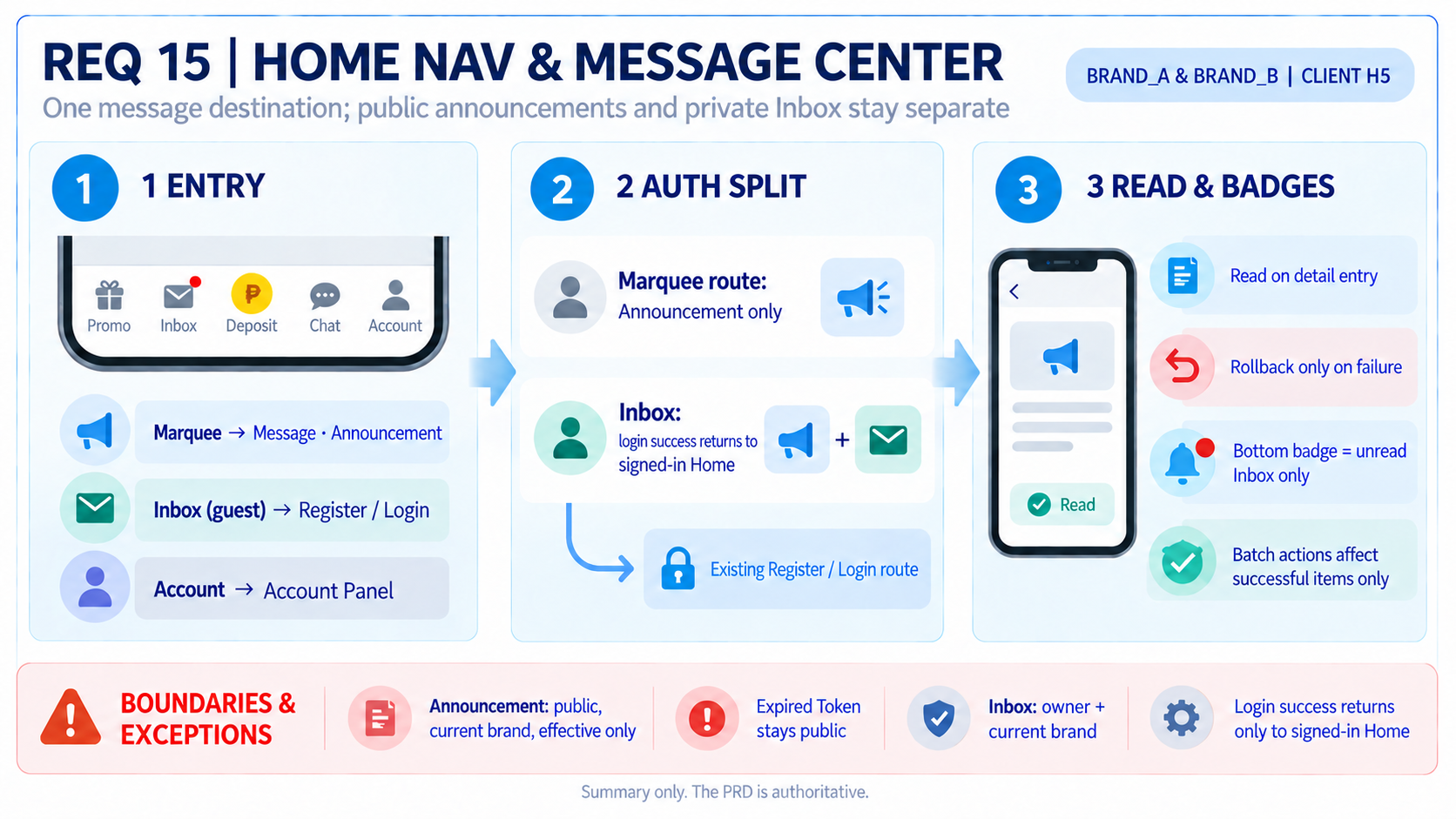
Promote Message Center to a primary client destination: the marquee
opens an Announcement-only page, while bottom Inbox retains
the existing authentication and return route; all message states follow
consistent per-item read, batch-delete, and badge rules.
② Fixed Terminology
| Term |
Sole Meaning in This Document |
| Announcement |
A public broadcast for the current brand; readable without a Token
and with an expired Token. |
| Inbox |
A private message readable only by its authenticated owner. |
| Message Center |
A secondary page with Back and without bottom navigation; hosts
Announcement and Inbox. |
| Effective announcement |
An announcement that the existing publishing module treats as
published, has published_at <= now, and is not
expired. |
| Optimistic read |
Clear the local badge on detail entry; roll it back only when the
read request explicitly fails. |
③ Global Invariants
| # |
Invariant |
Failure Impact |
Verification |
| G1 |
Announcements are public; Inbox messages are owner-only |
Public content is blocked or private content leaks |
AC8 AC9 AC17 |
| G2 |
The bottom Inbox badge represents unread Inbox
only |
Announcements create a false private-message alert |
AC12 |
| G3 |
Guest announcements remain unread after opening |
The client fabricates a user-specific read state |
AC11 |
| G4 |
Detail entry marks read; only explicit failure rolls back; refresh
cannot override pending optimistic state |
Badges flicker or messages are misclassified |
AC13 AC14 |
| G5 |
Batch delete removes successful items only; deletion is
terminal |
Items are removed, restored, or counted incorrectly |
AC15 AC16 |
| G6 |
Only effective announcements for the current brand are exposed |
Cross-brand or unpublished content leaks |
AC10 |
④ Scope and Explicit
Exclusions
In scope
- Home entries, login routing, and post-login return (§1).
- Message Center states, lists, details, and Back behavior (§2).
- Badges, per-item read state, batch delete, and convergence (§3).
- Brand, identity, security, and failure degradation (§4).
Out of scope
- Home Header, Banner, Game Lobby, and existing
Promo/Deposit/Chat behavior.
- Announcement/Inbox publishing backoffice, announcement-effective
algorithm, and soft/hard deletion implementation.
- Affiliate page content and system monitoring.
Readers are client frontend, backend, and QA.
1. Entry and Routing
1.1 Entry Semantics
Established Here
| Entry |
Guest |
Authenticated |
| Home marquee |
Message Center with one Announcement tab |
Message Center with one Announcement tab |
Bottom Inbox |
Existing Register/Login page; return to signed-in Home after
success |
Message Center Inbox tab |
Bottom Account |
Login; return to signed-in Home after success |
Open Account panel |
Account Announcement |
Unreachable because Account already gates login |
Message Center Announcement tab |
Account Affiliate |
Unreachable because Account already gates login |
Existing Affiliate page |
1.1.1 The marquee changes from an announcement modal
to the Announcement list. It does not open or focus the tapped
announcement.
1.1.2 Regardless of authentication state, marquee
entry shows Announcement as the only page/tab.
Inbox is not exposed from this entry.
1.1.3 The bottom item is named exactly
Inbox. A guest click on Inbox or
Account enters the existing Register/Login page. After
successful login, the app returns only to signed-in Home and does not
directly open Message Center Inbox or the Account panel. This
requirement reuses and regression-protects the live authentication flow
rather than rebuilding it.
1.1.4 Authentication is checked at click time. After
login, Home must immediately show the signed-in state; the user must
click Inbox or Account again to enter that
destination.
2. Message Center
2.1 Page States
| State |
Tabs |
Initial View |
Shell |
| Guest / expired Token on public announcement request |
Announcement only, with the single-tab bar
retained |
Announcement |
Back; no bottom navigation |
Authenticated, entered from bottom Inbox |
Announcement + Inbox |
Inbox |
Back; no bottom navigation |
| Authenticated, entered from marquee |
Announcement only, retaining the single-tab bar |
Announcement |
Back; no bottom navigation |
| Authenticated, entered from Account |
Announcement + Inbox |
Announcement |
Back; no bottom navigation |
2.1.1 Back returns to the source; if the source is
invalid, return Home.
2.2 Lists and Details
| Object |
List |
Detail and Actions |
| Announcement |
Title, MM/DD/YYYY HH:mm:ss, View; no cover
image |
Title, time, body; authenticated detail entry marks read |
| Inbox |
Title, time, View; top-right Select enters
selection mode |
Detail entry marks read; the selection footer contains only
Select All and Delete, with no
Mark as Read |
2.2.1 Load the newest data on entry, use
cursor-based infinite scroll, and support pull-to-refresh. Each tab
loads on first use; later tab switches only reveal cached data unless
explicitly refreshed.
2.2.2 An empty list shows
No more data…. An authenticated empty Inbox remains on
Inbox and never auto-switches to Announcement.
3. Read State, Badges,
and Batch Delete
3.1 Badge Matrix
| Location |
Authenticated |
Guest / Public Fallback |
Bottom Inbox |
On only when unread Inbox exists; Announcement never
contributes |
Off |
Announcement tab/row |
The tab label has no badge; rows follow is_read |
The tab label has no badge; every row stays on |
Inbox tab/row |
The tab label has no badge; rows follow is_read |
Hidden |
3.2 Single-item Read
3.2.1 Entering an Announcement or Inbox detail
optimistically clears its row badge and submits the read request.
3.2.2 Success keeps the read state. Only explicit
failure restores the badge. While the request is pending,
pull-to-refresh returning is_read=false must not override
the optimistic state.
3.2.3 Guest/public-fallback announcement details
submit no read request and remain is_read=false after
Back.
3.3 Batch Delete and
Concurrency
| Action |
Successful Items |
Failed Items |
Badge Effect |
| Batch delete |
Remove rows |
Preserve state |
Recalculate the bottom Inbox badge from remaining
unread items |
3.3.1 Apply the delete-batch response to the local
Inbox source immediately even when another tab is visible.
3.3.2 When delete and read race on one message,
deletion is terminal. Concurrent reads are idempotent; any successful
request converges to read.
3.3.3 Messages delivered during deletion and IDs not
reported successful must remain.
4. Data, Security, and
Failure Behavior
4.1 Identity and Scope
| Object |
Read |
State Change |
Uniform Failure |
| Announcement |
Public; current brand; effective only |
Only authenticated users write their own read state |
Unpublished, expired, cross-brand, and missing IDs fail
uniformly |
| Inbox |
Owner from Token plus current brand |
detail/read/delete batch validate every item |
Missing, non-owner, and cross-brand IDs fail uniformly |
Never take user identity from request parameters. Lists and details
return only necessary fields and no other-user data or internal
metrics.
4.2 Failure and Degradation
| Scenario |
System Result |
User-visible Result |
| Expired Token on announcement API |
Public fallback with is_read=false |
Stay on Announcement; no message and no login redirect |
Private API E_AUTH |
Clear local session; disable private interaction |
Toast, then login; private content is no longer shown |
| List failure with cache |
Use stale content and allow recovery |
Cache plus skeleton; refresh/retry available |
| List failure without cache |
Do not invent content |
Skeleton plus Retry |
| Retry fails |
Stay on current page |
Lightweight Toast; retry remains available |
| Badge API fails |
Temporarily treat as no unread |
Hide badge; restore on any later success |
Invalid cursors, page deduplication, empty/maximum/deduplicated
delete-batch input, deletion implementation, and the
announcement-effective algorithm reuse existing platform behavior.
5. UI Messages
| Scenario |
Chinese Reference |
English Production Copy |
Presentation and Result |
| Private API session expires |
登录已过期,请重新登录 |
Session expired. Please log in again. |
↪ Platform-generic; lightweight Toast, then login. |
| List empty / end reached |
没有更多资料… |
No more data… |
Empty state or list footer. |
| Retry still fails |
网络异常,请稍后再试。 |
Network error. Please try again later. |
Lightweight Toast; stay and allow retry. |
6. Open Points
None. Items that reuse existing implementation are not new product
decisions.
Appendix A: Acceptance Criteria
| # |
P |
Acceptance Criterion |
| AC1 |
P0 |
Guest bottom Inbox/Account clicks enter the existing
Register/Login page. After success, both return only to signed-in Home,
without directly opening Message Center or Account; authentication
itself is not rebuilt here. |
| AC2 |
P0 |
Authenticated entry from bottom Inbox, marquee, and Account
Announcement selects Inbox, Announcement, and Announcement respectively;
marquee exposes Announcement as the only page/tab. |
| AC3 |
P0 |
In every authentication state, the marquee opens the
Announcement-only page: no Inbox, modal, or direct detail. |
| AC4 |
P1 |
Message Center has Back and no bottom navigation; invalid source
returns Home. |
| AC5 |
P1 |
Empty authenticated Inbox stays on Inbox and shows
No more data…. |
| AC6 |
P1 |
Announcement rows have no cover image and use the required time and
View format. |
| AC7 |
P1 |
Home shows all five bottom items as `Promo |
| AC8 |
P0 |
Missing/expired Token still receives effective current-brand
announcements without E_AUTH. |
| AC9 |
P0 |
Inbox detail/read/delete batch rejects invalid, cross-brand, and
non-owner IDs with a uniform failure. |
| AC10 |
P0 |
Unpublished, future, expired, and cross-brand announcements are
absent and cannot be enumerated through detail/read. |
| AC11 |
P0 |
Guest announcement rows stay badged after detail and Back; the tab
label has no badge. |
| AC12 |
P0 |
Only unread Inbox can light the bottom Inbox badge. |
| AC13 |
P0 |
Detail entry optimistically clears the badge; explicit failure
restores it; success does not depend on Back. |
| AC14 |
P0 |
Refresh returning unread while read is pending cannot relight the
badge. |
| AC15 |
P0 |
Partial delete-batch success removes successful items only and
recalculates the bottom Inbox badge; no batch-read or
Mark as Read action is exposed. |
| AC16 |
P0 |
Delete wins over a racing read; newly delivered messages
remain. |
| AC17 |
P0 |
Private E_AUTH shows the exact Toast, clears the
session, disables private interaction, and enters Login. |
| AC18 |
P1 |
List and badge failures degrade and later recover exactly as defined
in §4.2. |
Appendix B: Sources and Precedence
- Business rules come from the finalized v1.3 PRD.
- Axure
更新5_home_首页 and
更新1_message_消息中心 provide interface and entry
evidence.
- This PRD wins over conflicting Axure details.
Appendix C: Prototype Visual Inventory
| Visual ID |
Surface |
Purpose |
Evidence |
VIS-CLIENT-NONE |
Client |
No content image or image placeholder; bottom icons are interface
symbols only |
L0 ④ |
C.1 | Required Deliverables
| Delivery ID |
Deliverable |
Required Coverage |
File |
INFO-ZH |
Chinese infographic |
Complete five-item bottom bar; marquee to Announcement only; login
success returns only to signed-in Home |
infographic/prd_v1.7_infographic.png |
INFO-EN |
English infographic |
Same product rules as the Chinese infographic |
infographic/prd_v1.7_infographic_en.png |
CLIENT-HOME |
Client HTML Home |
Production-structure reference, all five bottom items, and item two
named Inbox |
prototype/Html_Client_v*_bottomNavMessageCenter.html |
CLIENT-ANNOUNCEMENT |
Client HTML Message Center |
Marquee route exposes Announcement only; bottom Inbox retains dual
tabs and opens Inbox |
Same as above |
BO-N/A |
BO HTML |
Not delivered: no new or changed BO page,
permission, or operation; existing Announcement/Inbox publishing BO is
reused |
N/A |
The table above is the machine-readable count contract for HTML
content images/placeholders; C.1 is the complete
human-readable deliverable list. The two must not be conflated. Icons,
device chrome, skeletons, badges, and annotation markers are not visual
asset slots.
Document version: v1.9 | Date: 2026-10-06 | Author: Luke | Status:
Pending Development Review